Turn any URL into a fillable PDF — or a screenshot.
One API call, rendered by real Chromium — and the render API that turns a web form into a PDF people can actually type into. Paste a URL below and watch it happen — no signup, no email, 5 free renders a day.
Owner mode — unlimited demo, not counted in stats.
Paste a URL. Press Render. Pick PDF and any form on that page comes back as real fillable fields — your URL, not just the examples below. Screenshots capture the whole page, top to bottom — not just the first screen. Same engine the paid API runs on, same output, no watermark.
Or try one:
✎️ Neither example is our page. The marked one is the Social Security Administration's benefits calculator on ssa.gov, a live government site you can open yourself and check against what comes back. It returns a PDF you can type into right here in the preview: click the chip, then click the result to enlarge and try the fields. Any URL you paste gets the same treatment in PDF mode — fillable forms are a base feature here, not a paid add-on.
Free demo: 5 renders a day per network address, no signup required. Public pages only — private and internal addresses are refused.
In your code
The same render, as one HTTP call
snapdok.io renders pages with real Chromium through Playwright, so your React, Vue and Tailwind templates come out looking exactly like they do in a browser. No headless cluster to babysit. Free for 250 renders a month, then $12.
# Any URL in. A PDF out.
curl -X POST https://snapdok.io/v1/render \
  -H "Authorization: Bearer ps_live_your_key" \
  -H "Content-Type: application/json" \
  -d '{"url":"https://example.com","format":"pdf"}' \
  --output invoice.pdf
Binary comes straight back in the response body — PDF, PNG or JPEG. No polling, no callbacks, no job queue.
Proof, on someone else's website
A real government form, turned into a PDF you can type into
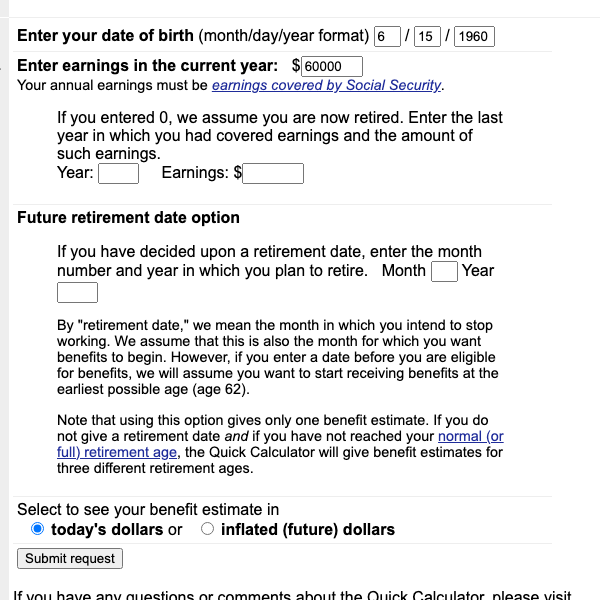
This is not a sample we built to flatter ourselves. It is the Social Security Administration's Quick Calculator — a live page on ssa.gov that anyone reading this can open in their own browser and check against the before capture. We do not control a pixel of it.
Before ssa.gov, as your browser draws it
After our PDF, opened in a reader
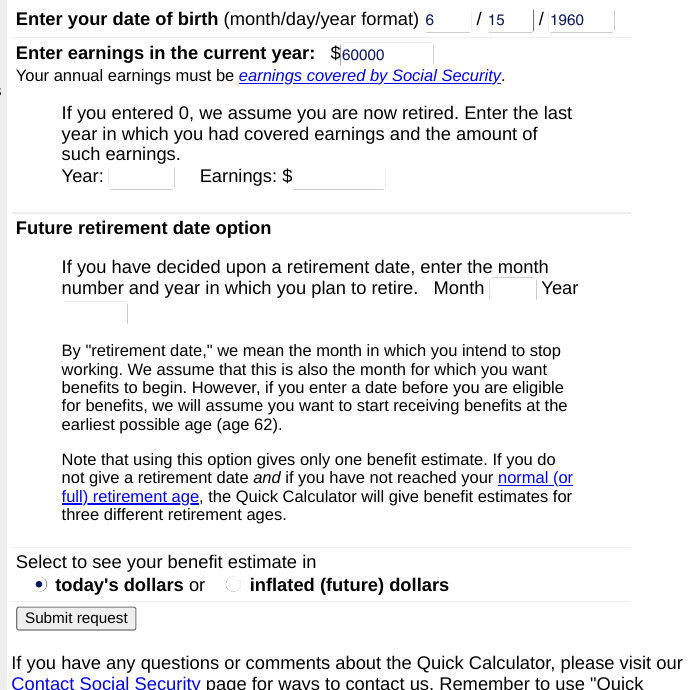
Same span of the same page, before and after. In the after capture every box is a real AcroForm field — click into it in Acrobat, macOS Preview or a phone reader and type. The values already on the page carry over, the empty boxes stay empty and typeable, and “today's dollars” is a working PDF radio group, not a picture of one. Nothing was retouched and nothing was cut out of the middle.
Want to check it yourself? Paste
https://www.ssa.gov/OACT/quickcalc/ into the box at the top of this page, pick PDF,
and you will get that same file — no signup, no key.
Why snapdok.io
A rendering service that behaves like a browser
If your invoice or report template is built with a modern framework, it only looks right once JavaScript has run and the fonts have loaded. That is the job snapdok.io is built for.
Fillable form PDFs — our specialty
Add pdf_forms: true to a PDF render and the form on the page comes back as
real AcroForm fields — open the file in Acrobat, macOS Preview or a phone reader and type
straight into it. Text, email, date, checkboxes, radio groups and dropdowns all carry over;
anything that cannot become a PDF field is skipped cleanly, never dropped in the wrong
place. Included in every plan, Free included — no add-on, no extra charge.
A form render is metered as one ordinary render.
Real Chromium, real JavaScript
Playwright drives an actual Chromium build. SPA hydration, web fonts, flexbox, grid,
CSS variables and @media print all behave the way they do on your machine.
PDF, PNG and JPEG
One endpoint, one format field. A4 PDFs with backgrounds printed,
full-page screenshots, or retina captures at up to 3× device scale.
Control over the capture
Viewport size, full_page, device_scale, a wait_until
strategy including networkidle, an extra delay, and your own timeout.
Repeat renders are free
Identical requests are served from a 24-hour cache with an X-Cache: HIT header
and are not counted against your quota.
CJK in its own glyphs, not tofu boxes
Chinese, Japanese and Korean pages come back as readable text, not □□□ — and
each language in its own typeface. A page marked lang="ja" is
drawn in Japanese kanji forms, not Chinese lookalikes. Nothing to configure, no
fonts-noto-cjk layer to bolt onto a Lambda. PDFs embed the font subset, so
the file reads correctly on a machine that has none.
Usage you can actually see
Every response carries X-Quota-Used / X-Quota-Remaining, and
GET /v1/usage reports your plan, period and balance any time.
Boring, predictable billing
Stripe handles the card. A failed render costs nothing — timeouts,
unreachable URLs, pages that error out: if we don't hand you a file, we don't count it.
Hit your allowance and you get a clean 402 with a next step — never a surprise
invoice for going over.
The whole API
Three endpoints. That is the entire surface.
You can read the docs in five minutes and be done. There is no SDK to install and nothing to configure.
| Endpoint | What it does |
|---|---|
POST /v1/render | Render a URL to PDF, PNG or JPEG. Binary in the response body. |
GET /v1/usage | Plan, renders used, remaining allowance, period dates. |
GET /health | Service and browser health. No key required. |
Pricing
Start free. Pay when it earns its keep.
No seats, no sales calls, no annual lock-in. Every plan is a hard cap — you are never billed for going over — and a render that fails is never counted. Prices in USD, tax added at checkout where required.
Every plan renders the same things. PDF, PNG and JPEG output
and fillable form PDFs (pdf_forms) are included on every tier, Free included, at no
extra charge. Plans differ by volume and rate — never by feature.
Free
Enough to build the whole integration and ship it.
- 250 renders every 30 days
- Resets 30 days after you sign up, then every 30 days
- PDF, PNG and JPEG output
- Fillable form PDFs included — no extra charge
- 2 requests / second
- No credit card
- Same rendering engine as paid plans
- Upgrade later — your key keeps working
Starter
For a live product with real invoice and report traffic.
- 3,000 renders per billing period
- PDF, PNG and JPEG output
- Fillable form PDFs included — no extra charge
- 5 requests / second
- Allowance resets on your renewal date
- Cancel any time, from Stripe
Growth
When document rendering sits in your core product loop.
- 15,000 renders per billing period
- PDF, PNG and JPEG output
- Fillable form PDFs included — no extra charge
- 5 requests / second
- Allowance resets on your renewal date
- Cancel any time, from Stripe
Scale
Batch runs, nightly statement jobs, whole-catalogue exports.
- 60,000 renders per billing period
- PDF, PNG and JPEG output
- Fillable form PDFs included — no extra charge
- 5 requests / second
- Allowance resets on your renewal date
- Cancel any time, from Stripe
How billing works
- Monthly quota resets each billing cycle. Unused requests don't roll over. Free keys reset every 30 days from signup; paid plans reset on your renewal date.
- Cache hits are free. An identical request inside 24 hours comes back
X-Cache: HITwithX-Quota-Charged: 0— it never touches your quota. - Failed renders are free. If we don't hand you a file, we don't count it. Timeouts, unreachable URLs and bad requests all cost nothing.
- Every plan is a hard cap. Run out and the API returns
402with an upgrade link. Nothing is ever charged automatically on top of your plan. - No per-feature pricing. On every plan, a form render
(
pdf_forms) is metered as one ordinary render — never a surcharge.
Payment is handled by Stripe Checkout — card details never touch our servers. Your API key is shown on the confirmation page the moment payment clears.
Get a free API key
250 renders a month, no card, no call. The key appears on this page — it is shown once.
FAQ
Questions people actually ask
Can it make a PDF form I can actually type into?
Yes — that is snapdok.io's specialty. Send "format":"pdf","pdf_forms":true and the
form controls on the page become real AcroForm fields in the PDF: text, email, tel, date,
password, number, textarea, checkboxes, radio groups and dropdowns. Open the file in Acrobat,
macOS Preview or a phone PDF reader, fill it in, save — the values survive reopening. Pages
with Chinese text get a font subset embedded automatically, so the fields accept Chinese
input too.
It is included in every plan — the free tier too. There is no add-on and no
per-feature pricing: a pdf_forms render is metered as one ordinary render, exactly
like a screenshot.
The boundaries, stated plainly: file pickers, sliders (range), color pickers,
hidden or invisible controls, and JS-built fake widgets (a div styled to look like
a dropdown) cannot become PDF fields — they are skipped cleanly and counted in the
X-Form-Skipped response header, never placed somewhere wrong. Forms inside iframes
are out of reach as well. The PDF is laid out with your page's print styles at paper width, so
width does not apply on this path.
curl -X POST https://snapdok.io/v1/render \
  -H "Authorization: Bearer $SNAPDOK_KEY" \
  -H "Content-Type: application/json" \
  -d '{"url":"https://your-app.com/intake-form","format":"pdf","pdf_forms":true}' \
  --output fillable.pdf
I only want the form part, not the whole web page. Can I get just that?
Yes. Add "pdf_form_only":true alongside pdf_forms and the PDF is
pruned down to just the form — the fields with their labels, the group headings, and the
title or intro text directly above the form. The navigation bar, sidebar, ads and footer are
left out. What you get looks like the paper version of the form rather than a printout of a
website, and it is still fully fillable.
It refuses to guess rather than cut too much. When the page has no visible controls, only a
lone search box, a form wrapping the whole page, controls inside an iframe, or JavaScript
widgets built from styled divs, the render falls back to the full page — the
exact bytes pdf_forms alone would have produced, never a half-broken cut. The
response tells you which happened: X-Form-Extracted is true for the
pruned form and false for the fallback, with the reason in
X-Form-Extract-Fallback. It is metered as one ordinary render, on every plan.
curl -X POST https://snapdok.io/v1/render \
  -H "Authorization: Bearer $SNAPDOK_KEY" \
  -H "Content-Type: application/json" \
  -d '{"url":"https://your-app.com/intake-form","format":"pdf",
       "pdf_forms":true,"pdf_form_only":true}' \
  --output form-only.pdf
What rendering engine is behind it?
Playwright driving Chromium — the same engine family your users browse with. JavaScript executes, modern CSS works, web fonts load.
My app is React / Vue / Next.js. Will it render?
Yes. Navigation waits for the wait_until strategy you choose. For heavy
client-side apps use "wait_until":"networkidle", and add
"delay":500 if you animate content in after load.
Chinese, Japanese or Korean text comes out as empty boxes elsewhere. Here?
It comes out as text. A stock headless Chromium — on Lambda, in a slim Docker image, on a
fresh VPS — ships no CJK fonts, so every ideograph and hangul syllable renders as a
.notdef box: □□□, the thing everyone calls tofu. Our render machines
have CJK fonts installed, so Simplified Chinese, Traditional Chinese, Japanese and Korean all
come back as real glyphs in PNG, JPEG and PDF. PDF output embeds a subset of the font, so the
file still reads correctly opened on a machine that has no CJK font at all.
They also come back in the right glyphs. Many Han characters are drawn differently
in Japanese, Simplified Chinese and Traditional Chinese even though they share one Unicode
codepoint, so a single pan-CJK font makes Japanese text look subtly Chinese to a native reader.
We install Noto Sans CJK JP, KR, SC and TC and route by the page's declared
language: lang="ja" renders in Japanese forms, lang="ko" in Korean,
lang="zh-CN" and lang="zh-TW" in their own. Declare the language on
the page and the typography follows it.
You do not have to send anything special — a page that just asks for
sans-serif is enough:
curl -X POST https://snapdok.io/v1/render \
  -H "Authorization: Bearer $SNAPDOK_KEY" \
  -H "Content-Type: application/json" \
  -d '{"url":"https://your-app.com/invoice/zh-CN","format":"pdf"}' \
  --output invoice.pdf
How do I get my API key?
Two ways, both instant. On the Free plan, put your email in the free key form above — no card, and the key appears on the page as soon as you submit. On a paid plan, the key is displayed on the Stripe confirmation page the moment payment clears.
Either way, copy it there and then: for security it is stored only as a hash afterwards, and the readable copy stays on screen for about ten minutes before it is wiped.
What happens when I run out of renders?
You get HTTP 402 with a JSON body explaining which allowance ran out, when it
resets and what to do next. Every plan is a hard cap, so nothing is charged automatically and
you can never receive a bill bigger than the plan you picked — you decide whether to wait for
the reset or move up a plan.
Do unused renders roll over?
No. Your monthly quota resets each billing cycle and unused requests do not carry over — free keys reset every 30 days from signup, paid plans on your renewal date.
Are repeat renders billed twice?
No. An identical request within 24 hours is served from cache, marked
X-Cache: HIT, and is not metered.
Can it render pages behind a login?
Not yet — the URL has to be publicly reachable. Cookie and header injection is on the roadmap; tell us if you need it and it moves up.
Where does it run, and what do you keep?
On Hetzner hardware in Falkenstein, Germany. Rendered files are held in a cache for up to 24 hours so repeat requests are free, then deleted. We store your key as a SHA-256 hash, the URLs you render are not retained beyond that cache window, and payment data lives with Stripe.
Who is behind snapdok.io?
snapdok.io is an independent product, not part of a larger vendor. It launched in 2026 with no customers yet, so you would be an early one — which also means your feature requests reach the engineering side directly, without passing through a support tier, and get answered.
Ready to render something?
Claim a free key, paste it into a
curl, and you have a PDF about ten seconds later. Upgrade whenever the free
250 a month stops being enough — the same key carries on working.